
Dashboard Scanning & Ticket Validation
To Manually Scan a ticket via the Dashboard:
- From the Megatix Dashboard select “Orders” from the left menu
- In the “Search” box type in the customer’s order oumber, name or email address linked to their purchase
- Select the desired Order Number highlighted in Blue
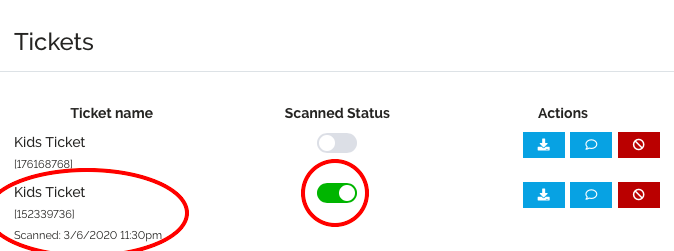
- Under the header “Tickets” you will be able to view all the tickets associated to the order
- Select the Grey Toggle, changing it to Green to redeem the ticket
To Check if a ticket has been Redeemed:
- From the Dashboard select “Orders”
- In the “Search” box type in the customers Order Number or Full Name linked to their ticket
- Select the Order Number highlighted in Blue
- Under the header “Tickets” you will be able to view all the tickets associated to the order
- Under the Ticket Name the Barcode Number is visible
- Under the header “Scanned Status” you will see a Grey or Green toggle
- Grey – Not Redeemed
- Green – Redeemed, you can view the date and time the ticket was scanned