
Settlement of Funds
Settlement is the process of transferring the balance of ticket sales to presenter’s bank account.
Settlement Schedules
Australia - Event settlement typically typically occurs the next business day following the event, unless otherwise stated.
Indonesia - First Monday or Friday after completion of the event. Events with sessions (Recurring/Multi Day) are settled by default after all sessions are completed. If you require a custom settlement schedule or would prefer payout after each session is complete please contact [email protected]
Other Regions - Please contact your local Megatix representative to find out more about settlement schedules in your area.
If you have not entered in your default bank details a banner will appear at the top of your Account Dashboard. If you have previously entered your default bank details select the “Presenters” Tab on the left panel. From here you can specify bank details per “Presenter” or “Brand” that you operate.
- A list of Promoter Accounts you are registered to will appear
- Select the Blue action button to add / edit the details for such account
- Select “Save & Exit”
If a particular event requires settlement to an alternative bank account to your default account follow these steps:
- Select the “Events” Tab on the left panel
- Select the “Event Summary” action button for the particular event you would like to edit the bank details
- Select “Settlement” from the left panel
- Under the “Settings” Header, tick the “Override Presenter bank details” box
- Enter the once-off bank details
- Select “Update”
On the “Settlement” tab you will see the header “Deductions”. Your Account Manager will regularly update this with any deductions necessary if applicable eg. hardcopy tickets, early settlement amounts, staffing costs etc. You will be able to view the outstanding settlement amount.
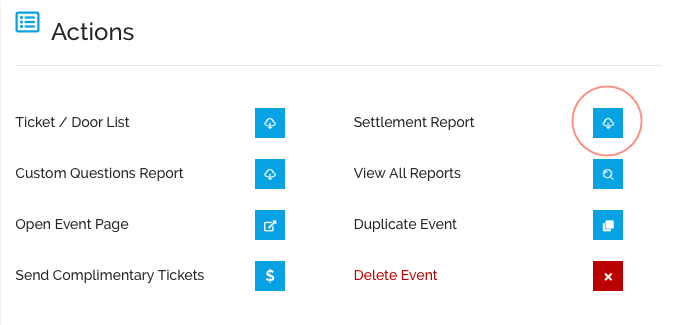
To Download the Settlement Report:
- Select “Summary” from the left panel
- Under the “Actions” header you will see a header titled “Settlement Report”
- Select the Blue action button to download the Settlement Report
If you have any questions regarding the settlement of your event please contact your Account Manager or [email protected].